
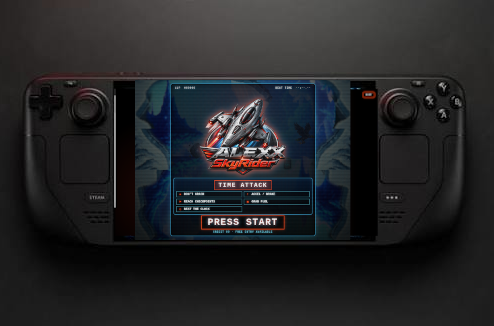
One of the most interesting tests during the development of ALEXX SkyRider™ happened on Steam Deck.
The question was simple:
Could a browser-based arcade experience like this actually feel playable on a handheld gaming system?
The answer, in the setup I tested, was yes.
But there was an important detail:
Firefox was the browser that worked successfully during testing.
That result became a good example of why I prefer saying Tested With instead of making broad compatibility claims.
The device matters.
The browser matters.
And the real result matters more than assumptions.
WHY STEAM DECK WAS AN INTERESTING TEST
Steam Deck is different from the desktop and laptop systems used during other tests.
It combines a computer environment with built-in gaming controls and a handheld form factor.
That made it especially interesting for ALEXX SkyRider™.
The project was created around the idea of opening the experience through a compatible browser and playing without a traditional installation process.
Steam Deck offered a chance to test that philosophy in a very different format.
Instead of sitting in front of a desktop monitor with a separate controller, the browser and gaming controls could exist in the same device.
That made the test useful not only technically, but also from the player's point of view.
FIREFOX WAS THE WORKING BROWSER
During the Steam Deck testing, Firefox was the browser that successfully ran the experience.
That detail is important enough to document clearly.
I do not use the Steam Deck result to say that every browser on the device will behave the same way.
The result I can actually stand behind is more specific:
ALEXX SkyRider™ was successfully played on Steam Deck using Firefox during testing.
That is the kind of statement I want Test Lab to preserve.
Not what should work.
What actually worked.
OPENING THE GAME IS ONLY THE FIRST STEP
A successful test was not simply seeing the ALEXX SkyRider™ page appear on the Steam Deck screen.
The important part was being able to play.
The test involved the actual arcade experience:
- loading the game;
- entering gameplay;
- using the controls;
- moving the ship;
- firing;
- hearing the audio;
- continuing through the route;
- watching for stability during play.
That distinction matters.
A page can load correctly while the game itself still has problems.
The useful result comes from actually playing long enough to see how the experience behaves.
THE HANDHELD FORMAT CHANGES THE FEEL
Playing on Steam Deck also changes the physical experience.
The screen is closer.
The controls are already in your hands.
The device feels more like a dedicated gaming machine than a traditional browser window on a desktop computer.
That does not change the rules of ALEXX SkyRider™.
The same route-reading skills still matter.
Speed still matters.
Braking still matters.
Enemies and obstacles still demand attention.
But the way you physically interact with the game feels different.
That is one of the reasons I find testing different hardware useful.
Compatibility is only one part of the story.
The same game can feel different depending on how you are playing it.
BUILT-IN CONTROLS AND DIRECT PLAY
One of the ideas behind ALEXX SkyRider™ is reducing the distance between opening the experience and actually playing.
That philosophy comes from the same PLUG AND PLAY idea that influenced the project from the beginning.
Steam Deck fit that idea in an interesting way.
The system already has gaming controls built into the device.
Once the compatible browser environment was working, the experience felt much closer to the idea of:
open the game;
take control;
play.
That is exactly the kind of modern interpretation of direct access that interested me when the project was being developed.
A SUCCESSFUL TEST STILL HAS LIMITS
A successful Steam Deck test does not mean I should write:
“ALEXX SkyRider™ works on every Steam Deck configuration.”
That would go beyond what was actually verified.
Browsers can change.
Software can change.
Settings can change.
Controller behavior can change.
The responsible conclusion is narrower:
Steam Deck was successfully used during ALEXX SkyRider™ testing with Firefox.
That is enough.
Test Lab is not about making the biggest possible claim.
It is about documenting the strongest claim the real test supports.
WHY THE BROWSER BECAME PART OF THE RESULT
This test also reinforced something that can be easy to overlook with browser games:
the browser itself is part of the environment.
When we say that a game is being played on a particular device, there is another layer between the player and the game.
The browser has to interpret the page.
It has to handle input.
It has to manage audio.
It has to display the game correctly.
That means a device name alone may not describe the complete test.
For Steam Deck, the useful documentation is not simply:
Steam Deck tested.
It is:
Steam Deck tested successfully with Firefox.
That extra detail makes the result more accurate.
WHAT THIS TEST TAUGHT ME
The Steam Deck test confirmed something important about the direction of ALEXX SkyRider™.
A browser game does not have to be experienced only at a desk.
With the right tested environment, the same project can move into a different kind of hardware and still remain recognizable.
The screen changes.
The physical controls change.
The way you hold the system changes.
But the arcade challenge remains.
For me, that is where modern browser technology becomes interesting.
It gives a project like ALEXX SkyRider™ the possibility of reaching different types of systems without changing the fundamental idea of the game.
TEST THE REAL EXPERIENCE, NOT THE DEVICE NAME
Steam Deck became one of the clearest examples of the testing philosophy behind this Blog.
I could simply put the device on a compatibility list.
But that would leave out the most useful part of the story.
The important information is:
what was used, how it was accessed and what actually worked.
In this case:
Steam Deck. Firefox. Real gameplay. Successful test.
That is the result.
And that is what Test Lab is here to document.